

Converting a PDF with complex tables to Word
Published
A table with merged cells and headers that span several columns is one of the hardest things to get out of a PDF intact. Here is what happens when one is converted with UnfoldPDF, unedited, and what to tidy up afterwards.
Why tables like this are difficult
A PDF doesn't store a table as rows and cells. It stores pieces of text at fixed positions, plus the lines drawn around them. To rebuild a Word table, a converter has to work out which text belongs in which cell from the layout alone.
Simple grids are manageable. The trouble starts with merged cells: a group label such as "Children" that covers three rows, or a year such as "2025" that sits above two columns. A converter that misses them shifts text into the wrong column, repeats labels, or gives up and places the table as loose text that can't be edited as a table.
The example
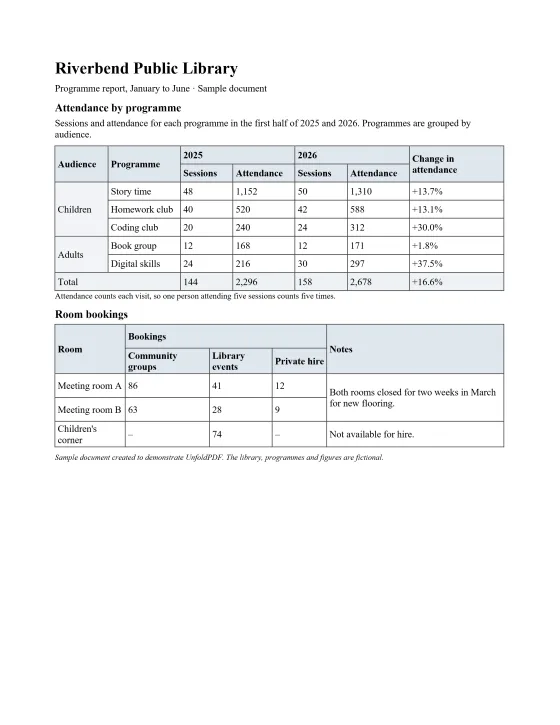
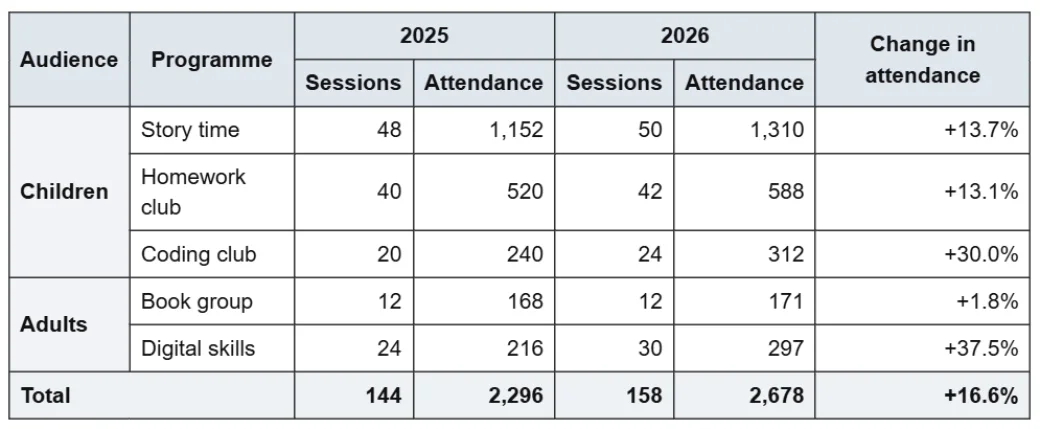
We made a one-page library report with two tables (the library and its figures are fictional) and converted it with the standard settings. The first table has a two-level header: each year spans a "Sessions" and an "Attendance" column, and three header cells run down both header rows. Its programmes are grouped by audience, with each group label covering several rows. The second table has a "Bookings" header over three columns and a note that covers two rows.
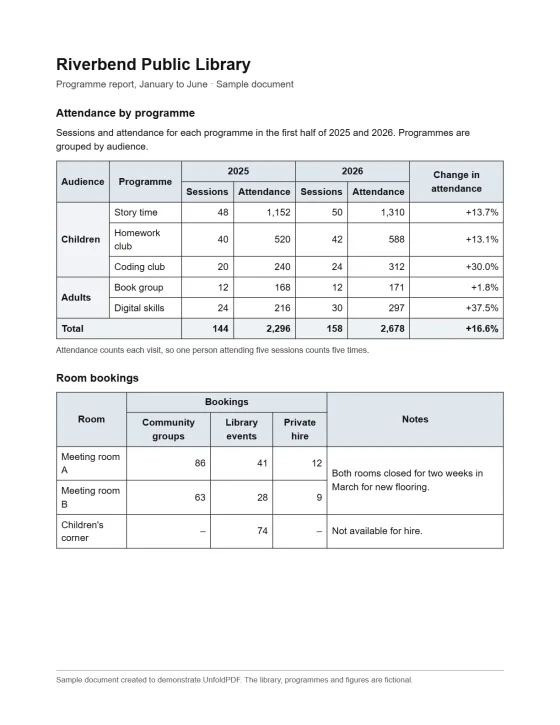
The attendance table, close up
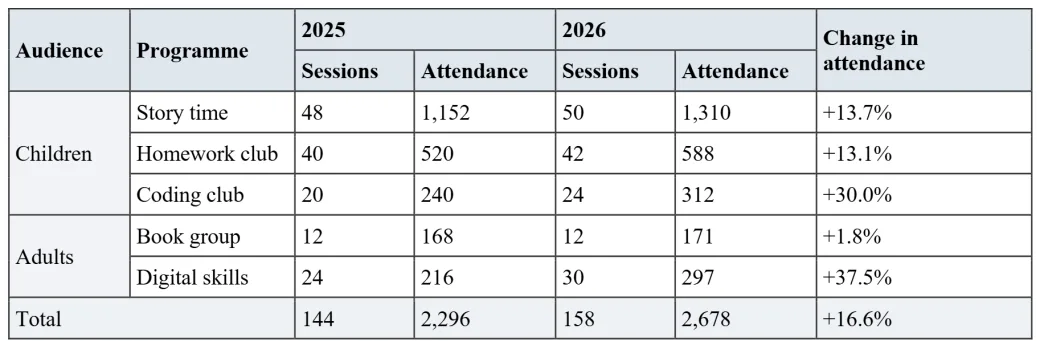
What came through as editable Word
- Both tables are real Word tables, not text boxes or pictures: 7 columns by 8 rows, and 5 columns by 5 rows.
- The two-level header kept its shape: "2025" and "2026" each span two columns, and "Audience", "Programme" and "Change in attendance" each run down both header rows.
- "Children" is one cell covering three rows and "Adults" one cell covering two, so the grouping stays clear. "Total" spans the first two columns, as in the PDF.
- In the second table, "Bookings" spans its three columns and the note about the closed rooms covers both rooms' rows.
- The cell shading is kept: the header rows, the group labels and the total row are shaded as in the PDF.
- Every number is in the right cell, as text you can edit. The title, subtitle and section headings are separate paragraphs, with the headings as Word headings, and the header row is set to repeat if the table runs onto a new page.
What needed fixing by hand
- Only the first of the two header rows is set to repeat on a new page. Select both rows and turn on Repeat Header Rows (Table Layout tab).
- Some bold was lost: "Children", "Adults" and the total row are bold in the PDF but plain in Word.
- Everything in the tables is left-aligned: in the PDF the numbers are right-aligned and the header labels centred.
- The text is in Times New Roman instead of the PDF's Arial, at the same sizes.
Tips for converting tables
- Convert only the pages you need. You choose pages before converting, and each converted page uses one credit from your balance.
- Check merged cells first. In Word, turn on View Gridlines (Table Layout tab) to see every cell boundary, including ones without a visible border.
- Re-apply number alignment in one go: select the number columns and right-align them together.
- Change the font once: press Ctrl+A and pick the font you want for the whole document.
Limitations
This is one document, and results depend on the layout and quality of yours, so check the table structure before relying on it. Complex multi-column layouts and low-resolution scans may need manual review. The cells contain the text the PDF holds.
Check it yourself: sample PDF (77 KB) · Word result (DOCX, 4 KB) The result is exactly what UnfoldPDF produced with its standard settings.